Posts

How to Make Bootale pen drive Without any Third party software

Image
हेलो Everyone  इस Blog Post में , मैं आपको बताने वाला हूँ की कैसे हम Command  Prompt  की मदद से PEN DRIVE  को Bootable बनाते है | मैं youtube video की सहायता से आपको ये जानकारी देना चाहता हूँ | अतः नीचे दिए गए video को पूरा देखे |

Learn How to reset theroot password of Redhat 7 Linux Operating system

Image
Hello Everyone,  इस Blog पोस्ट में , मैं आपको बताने वाला हूँ की कैसे हम Redhat Linux 7 में ROOT  यूजर का पासवर्ड ब्रेक कर सकते है. तो यहां पर मैं youtube video की सहायता से आपको ये जानकारी देना चाहता हूँ | अतः नीचे दिए गए video को पूरा देखे |     

Computer Booting and the ways that is used to boot the computer system

Image
In this post,we will learn about the Computer booting process, what is it and type of it and the ways by which we can  boot the system . So, First we need to understand what is booting ? when we turn on the system, there is an operation performed by the computer to load operating system automatically, that process is known as Booting Process . So simply say that the process when we  start and restart the computer that is known as the  Booting . There are two type of booting :- 1) Cold booting 2) Warm booting  Cold booting :- When we turn on the computer from the powering off state, that booting process is known as Cold booting . Warm Booting :-  When the computer is restarted when it is powered on that process is known as Warm Booting  . Now we will see , How does a computer boot up ? Now We will see the way by which we can boot the computer and install the operating system. So, there are three way of the booting :- 1)...

Storage Units

In this post , I will tell you about what is storage unit and are different storage units . Storage unit is used to define about that unit of measurement how much information can you save in the storage device. It is similar that When you purchase the milk from any milk store, you will measure in the unit called as liter.          Similarly in the computer , the storage device will store the information in the form of the storage unit. The smallest unit of the computer ,is also known as the bit . It can be either 0 or 1.  so, when we combine 4 bits together , it is called as Nibble .                                                            ...

How to migrate User state from one computer to another computer by using USMT tool ?

Image
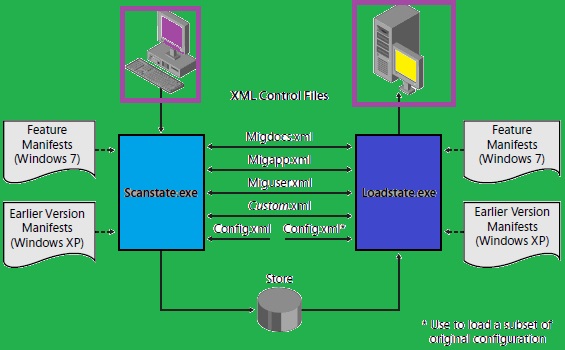
In this tutorial , I will tell you about,  How can you migrate user state of one computer to another computer by using USMT tool. SO firstly we need to need to know What is USMT. USMT stands for user state migration tool  that is used to transfer user state from one computer to another computer . Note:- User State defines about the documents and settings of the particular user profile . USMT uses two commands or components to transfer the User State : 1) Scanstate 2) Loadstate USMT also uses four types of configuration files to transfer the settings of the users: 1) MigApp.xml 2) MigDocs.xml 3) Miguser.xml 4) config.xml So now I will tell you the steps to transfer the user state profiles :- 1) First, Download MS Deployment toolkit . 2) Choose USMT only. 3) copy USMT to the USB drive from c:\program Files (x86)\Windows Kits\10\Assessment and Deployment Kit\ User State Migration Tool. and Rename the directory x86 as usmtx86 and amd64 as   usmtx...

Interview Question and answer For CCNA

Image
Top Interview Question and answer for the CCNA In this blog I will You about the Top interview Question that is asked for CCNA interview . Q:1 What is router ? At which layer this device does work ? Ans : Router is a networking device that is used to connect two or more different network . Router pass the incoming packets from on Lan to another Lan according to the ip addresses stored in the incoming packets . Router  works at Network layer of the OSI model . Q:2  What is routing  ? Ans :   Routing is the process that is used for select the best path (shortest path) between the source and Destination for forward the data .  Routing is performed by the dedicated device that is known as the Router .    Q:3   Which cable is used to take the console of router ?                                               ...

How to show hidden drive that is hide by using command prompt (command prompt से hide हुई drive को कैसे Show करे |)

Image
How to show hidden drive that hide by using the command Prompt . (command prompt से hide हुई drive को कैसे Show करे |) Hi , everyone Today I will show you how to show hidden drive of the Computer that is hide by using the Command prompt . In the previous post i have shown you how to hide a drive by using the command prompt .  So let's start How to show hidden drive from command Prompt . So in last post as you have seen in the last picture I have shown you the drive had hidden . I will again show you that picture of my computer that I hide . so here you can see the drive ( Local disk E:) is not here beacause it is hide . So start the process to show the hidden drive by using the Command prompt . To show the hidden drive you need to use the following steps : STEP 1 :  Press window + R key from the keyboard , Run dialog box appears on the screen . Here Type the command cmd to open the command Prompt . ...

All Run Commands list in windows 7, 8, 8.1 and 10

Image
The complete list of windows 7 run commands : In this tutorial , I will tell all of you about the windows run shortcut commands. Windows run command is just the shortcut of the particular program . In other words we can say that the Windows run command is the actual name of the program that start the application . Lets learn about the Windows Run Commands . 1) Winver -This command is used to show about the windows version . 2) Cmd -  This command is used to open the Command prompt . 3) mspaint - This command is used for open the mspaint application. 4) Taskmgr.exe - This command is used for open the Task manager . 5)   Diskmgmt.msc -This command  is used for open the Disk management . 6) Devmgmt.msc - This command is used for the open the driver management. 7) Dxdiag - this command is used for open the direct x diagnostics tool . 8) Cleanmgr  : - This command is basically used for open the diskcleanup tool . 9) D...

(Computer drive को command Prompt से कैसे hide करते है |) How to hide a drive in your computer by using command Prompt

Image
HOW TO HIDE THE COMPUTER DRIVE BY USING THE COMMAND PROMPT इस पोस्ट में मैं आप सभी लोगो को एक trick बताऊंगा जिससे आप अपने या अपने किसी Friend के Computer drive को छुपा सकते है | computer  drive  जैसे C : , D : etc  को छुपने के लिए हम ग्रुप हम Command Prompt का Use  करेंगे | To hide a drive using command Prompt , You need to perform following steps : Before starting how to hide the computer drive , I will show you My Computer  drives . in this , I will hide the drive (Local disk E:) . So let's start the process . STEP 1 : Press Window + R key from the keyboard , It will open the Run dialog   Box . Here type the Command cmd to open  the command prompt window.    STEP 2 : In the command prompt window type the command Diskpart . after   this you need to type the command list volume . This command will show you all the all drives of your computer . STEP 3 : Here you need to decide which driv...

WHAT IS AN EMAIL client (English version)

Image
In this blog I will tell you about What is an Email Client . As Everyone know that    Email stands for Electronic mail. it is method of exchanging digital information by using digital devices such as Computer , mobile phone and tablets .  There are two ways to send the Email or digital meassages :  1) By using Web based client  2) By using Email client Now in Your mind one question arises that What is Web based client And What is Email clients . So first I will tell you What is Web based Client . Web based client are those clients that used the Web browser such Google chrome, Internet explorer, mozilla firefox  etc. for exchanging digital information (Email) .    Some few example of Web based email clients are :         Gmail       Yahoo       hotmail     Now you are thinking that if these are web clients then What is an Email Client  .      ...

EMAIL Client क्या है | (What is E-mail Client in hindi )

Image
In this blog we will learn about What is an Email Client ? इस ब्लॉग में हम सीखेंगे के Email-client बारे में . तो है क्या Email Client  Email client एक एप्लीकेशन और सॉफ्टवेर है जो ईमेल को Send और Receive करने का काम करता है  और यह सॉफ्टवेर मेल को संयोजित करने का काम करता है | EMAIL client को हम   E-mail Reader और   Mail User Agent (MUA) के नाम से भी जानते है| POPULAR E-MAIL CLIENTS : कुछ Popular Email Clients  के नाम है जैसे Mozilla thunderbird ,  MS-outlook , Foxmail , The Bat, Pegasus mail, IBM Notes, Apple mail , Windows Mail , Outlook express etc. INFORMATION REQUIRED TO CONFIGURE EMAIL CLIENTS : Email Client को Configure  करने से पहले कुछ सूचनाओ की जरूरत होती है | जैसे की : 1)  ईमेल एड्रेस  2)  यूजरनाम और पासवर्ड  3)   SMTP  और  POP सर्वर का नाम  4)  SMTP    और  POP  सर्वर का  Port Number 5)   SMTP Authentication सेटिंग...

How to create User from the command prompt ?

Image
 In this Post , I will you tell you about how to create any user by using command prompt . in point of view working on the command prompt is so easy as compare than graphical . you just need to open command Prompt , then type some command on it and you will see some different result ? So , To create user from the command prompt You need to follow these steps:   1) Press Windows + R key from the keyboard . Run dialog box appears on the screen .here type cmd 2) Now, command prompt window appears on the screen . Here , You need to  type net user command  to see the available user in the system.  3)    Now if you want to create a new user type the command net user username password /add . (for example :    net user amit 123 /add) 4) So this command is used to create a new user .  If you want to check the new user that bis created or not , so check by using the command net user  (this...

How to enable and disable firewall by using command prompt.

Image
Before starting this tutorial the first question  arises in the mind that What is firewall.  So firewall is a component of the network that is used to protect the system from the unauthorized access. firewall is just like as the security guard that protects your environment of your building or the office.   there are two types of firewall :  1) Hardware Firewall  2) Software Firewall Hardware firewall is the network component or device that protect  your whole internal network from the unauthorized access.                                                                                 If we talk about software firewall it is an inbuilt feature of the Microsoft windows operating system that is used for protect your own system f...

how to block command prompt in window operating system

Image

How to make bootable pen drive to install any operating system

Today in post we will learn about how to make a bootable  pen drive by using simply typing some commands on the command prompt.         To make a bootable pen drive you should have at least 4GB pen drive, operating system set up files and use some commands on the command prompt to make a pen drive bootable.       For making bootable pen drive you need to follow these steps: 1) first open the command prompt with administrative rights. for this type the cmd on the start search bar and right click on the cmd and select run as administrator.  2) Now a UAC dialog box appears on the screen click on YES button .  Here a command prompt appears on the screens . 3) on the command prompt , type the following commands:           DISKPART            LIST DISK            SELECT DISK 1          ...